Welcome to Revopedia! This is our 3D scanning knowledge base and information center for all users. This guide will help you quickly understand and use our products efficiently.

¶ What is Revopedia?
Revopedia is an online platform for 3D scanner users, offering product manuals, troubleshooting guides, software tutorials, and scanning tips. Both beginners and advanced users can find useful information to enhance their experience with Revopoint 3D scanners.
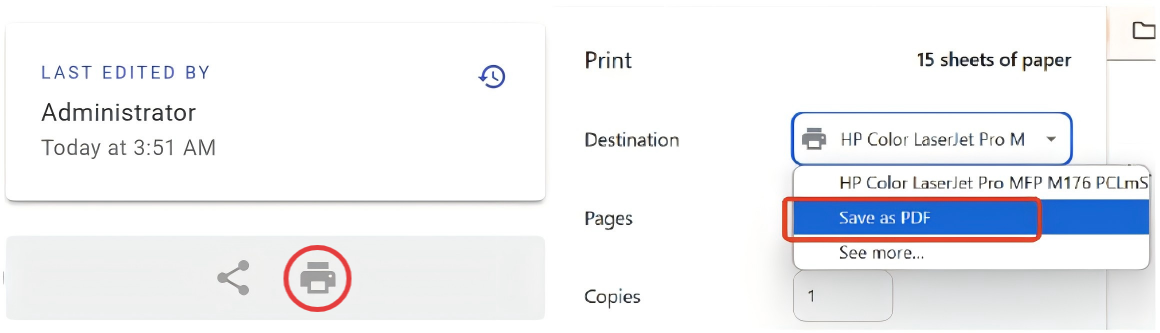
To save the current webpage as a PDF manual, scroll down to the bottom of the Contents bar, tap the printer icon, and then choose "Save as PDF" from the options presented.
¶ Help us do better!
Revopedia is still under construction, and new content will be added continuously. We welcome any comments and suggestions you may have to help improve our content.
¶ Update Notes
| Minimum PC Requirements | |
|
Windows System Version: Windows 10/11 (64-bit) RAM: ≥ 32 GB CPU: Intel i7 13th Gen or AMD Ryzen 7 5800 GPU: NVIDIA GeForce RTX 3060 (8 GB) |
macOS System Version: macOS 11.0 or better RAM(MetroX): ≥ 16 GB RAM(MetroX Pro): ≥ 18 GB CPU (MetroX): M1 Pro/Max/Ultra CPU(MetroX Pro): M3 Pro/M4 |
| Revo Measure V1.1.0 Updates: | |
|
1. Adds template measurement for batch measuring a single model, allowing users to create custom templates. 2. Adds cone feature support. 3. Adds batch feature creation from CAD models. 4. Adds distance measurement along the X, Y, and Z axes. 5. Adds point deviation measurement at specified locations. 6. Adds feature creation from a reference mesh model. 7. Adds model unit settings, supporting millimeters, centimeters, meters, inches, and feet. 8. Adds decimal precision settings for model data. 9. Adds a lasso selector. 10. Fixes some bugs. 11. Optimizes user experience for certain features. |
|