¶ 1.Exported Report Files
After generating a report, navigate to:
Revo Measure > Report and open the folder with the same name as the exported report.
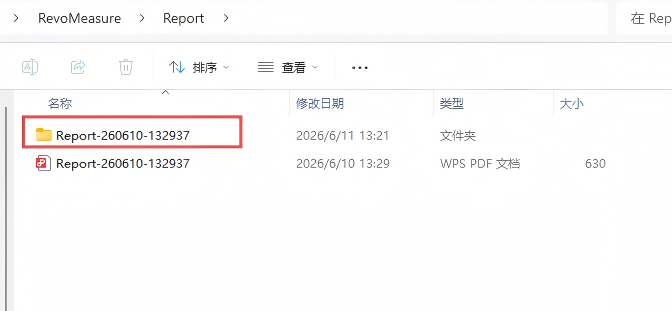
The folder contains the following files and directories:
| File/Folder | Description |
|---|---|
| fonts | Common fonts used by the report, including Chinese, English, Japanese, and Korean fonts |
| image | All images required to generate the report |
| translations | Multilingual translation resources used by the report |
| processReport.py | Sample script |
| users.json | Measurement data used by the report |
¶ 2.Using the Sample Script
Run processReport.py from within the report folder.
The language of the output report is specified through a command-line parameter.
Currently supported languages include:
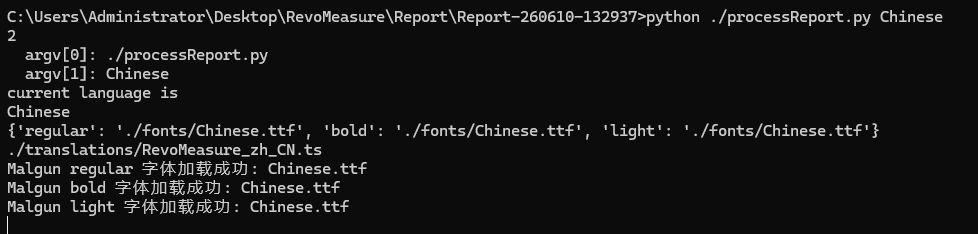
The command-line argument specifies the language type of the output report. The current script supports Chinese, English, Japanese, and Korean:
python ./processReport.py Chinese
python ./processReport.py English
python ./processReport.py Japanese
python ./processReport.py Korea
¶ 3.Output
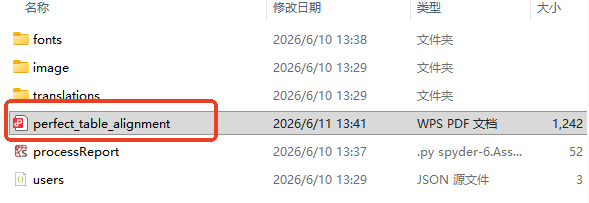
After execution, the script automatically generates a PDF report in the selected language within the current directory.
¶ 4.Notes
- The sample script must be executed from the report folder generated during export.
- The sample script is provided for reference only. Users should modify and extend it according to their own application requirements.